Download
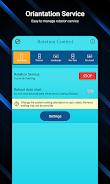
EasyScreenRotationManager is a handy app that gives you complete control over your phone's screen orientation. With this app, you can effortlessly switch between various screen orientations like Permanent Portrait, Permanent Landscape, Reverse portrait and landscape, and sensor-based orientations. The app also lets you personalize your notification panel by customizing its colors and adding up to 5 rotation controls. You can even set specific orientations for individual apps. Additionally, the app offers a notification lock screen feature and the ability to enable or disable the rotation service after your phone restarts. Download EasyScreenRotationManager and manage your screen orientation with ease.
Features of the EasyScreenRotationManager app:
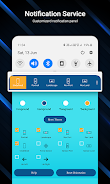
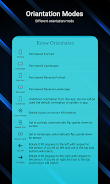
- Control phone screen orientation: The app allows you to control your phone's screen orientation using the notification panel. Choose from multiple screen orientation options, including Permanent Portrait, Permanent Landscape, Reverse portrait and landscape, sensor-based, and more.
- Customize notification panel: Personalize your notification panel by changing its colors. You can also add up to 5 rotation controls to the notification panel for quick access.
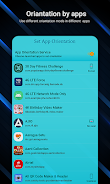
- Set app orientation: Enable the app orientation service to set specific orientations for individual apps. This allows you to open one app in portrait mode and another in landscape mode, for example.
- Reset default theme and default orientation: The app provides the option to reset the default theme and default orientation for the notification panel.
- Notification permission settings: The app displays a warning if the system settings are not set to autorotate. It also allows you to enable or disable the lock screen for the notification panel and manage system notification settings within the app.
- Restart service after phone reboot: You can enable or disable the rotation service after your phone restarts within the app.
Conclusion:
EasyScreenRotationManager is a user-friendly app that provides convenient control over your phone's screen orientation. It offers a wide range of options for setting screen orientations, customizing the notification panel, and managing app-specific orientations. With additional features like notification privacy settings and the ability to restart the rotation service after phone reboot, this app offers a comprehensive solution for managing screen orientation on your phone. Download it now to easily manage screen orientation anywhere and anytime.