Download
A feature-packed reader with compatibility for all popular eBook formats.
FullReader is a multifunctional e-book reading app, perfect for opening PDFs, DjVu files, magazines, comics, listening to audiobooks, and working with documents on your smartphone or tablet.
SUPPORTED FORMATS
fb2, ePub, txt, PDF, doc, docx, cbr, cbz, rtf, DjVu, DjV, html, htm, mobi, xps, oxps, odt, rar, zip, 7z, MP3.
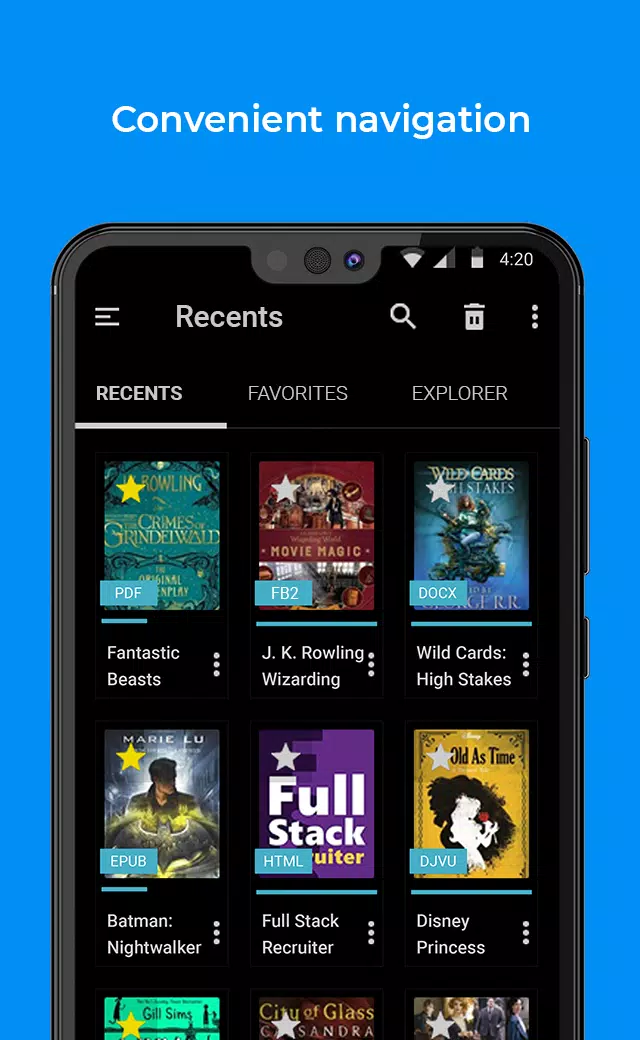
CONVENIENT AND STYLISH INTERFACE
This Android reader offers a user-friendly interface with clear navigation and a well-organized layout. Choose a classic light theme or a new energy-efficient black theme for AMOLED displays. Display book covers as a list or in tiles.
FILE MANAGER
Enjoy the convenient Explorer to scan your device, find all supported files, search books by various criteria, and use a full-featured toolset for file operations.
MY LIBRARY
A well-organized library section for your e-books with sorting by various criteria. Create Favorites lists and your own personal Collections.
CLOUD STORAGES
FullReader integrates with Google Drive, Dropbox, and OneDrive, saving space on your device and syncing your library across multiple devices.
OPDS-CATALOGUES
Add your favorite online libraries and download books directly without leaving the app.
CUSTOMIZABLE TOOLBAR
Customize the reading window toolbar by choosing which tools to display and arranging them to suit your preferences.
READING ALOUD
Benefit from the built-in TTS engine. Customize reading speed, voice, tone, and the highlight color for the text being read.
BUILT-IN TRANSLATOR
The integrated translator supports 95 languages and requires no additional dictionaries.
NOTES AND BOOKMARKS
Add colorful notes to highlight important text and bookmark interesting pages. Manage them from the reading window or a dedicated menu. Notes are grouped by book and can be exported. Bookmarks are also available for audiobooks.
DAY/NIGHT MODES
Optimal color schemes for the reading window, perfect for any time of day. Set modes to switch automatically.
TAP-ZONES
Configure tap zones for quick access to your most-used options and tools while reading.
SETTINGS
A wide range of settings is available: quick settings in the reading window, advanced, and general options. Control brightness with a handy widget right in the reading window.
BOOK INFO
View detailed book information, perform basic operations, and edit or add new details in this dedicated section.
MP3
Play audiobooks in MP3 format. Create bookmarks during playback, build playlists, and control your listening experience.
WIDGETS AND BOOK SHORTCUTS
Create book shortcuts and use home screen widgets for instant access to your reading from your device's display.
LOCALISATION
The app is fully localized in popular worldwide languages: Russian, Ukrainian, English, German, French, Spanish, Portuguese, Italian, and Vietnamese.
USER SUPPORT
We value every user, especially those who are fair and reasonable! :) We appreciate all your feedback and are always ready to answer questions and address comments.