Download
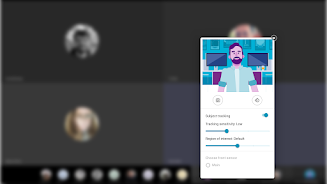
Introducing the Moto Camera Desktop Settings App! Enhance your video calls with customized camera settings while connected to an external screen using the ReadyFor platform.
Stay Focused with Subject Tracking
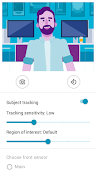
Keep your subjects perfectly centered in the frame with our intelligent subject tracking feature. It uses advanced software to recognize up to 3 faces simultaneously, ensuring everyone stays in focus. Adjust the tracking sensitivity to control how quickly the camera zooms when a subject moves, giving you the perfect balance between smooth transitions and responsiveness.
Control Your View
Expand the region of interest to fill the screen with your subjects or narrow it down to include more of the surrounding environment. Tailor your video call to your needs, whether it's a close-up on a presentation or a wider shot of a group discussion.
Choose Your Camera
If your front or rear camera has multiple sensors, you can select the one that best suits your needs. You can also rotate the camera vertically or horizontally for the perfect angle.
Download Now and Experience the Difference
Unlock these amazing Motorola camera settings and elevate your video calling experience. Download the Moto Camera Desktop Settings App today!
Key Features:
- Customize camera settings for enhanced video calls while connected to an external screen.
- Subject tracking keeps subjects centered in the frame.
- Smart software recognizes up to 3 faces in the same frame.
- Adjust tracking sensitivity to control zooming when a subject moves.
- Increase or decrease the region of interest to include more or less of the field of view with subjects.
- Choose which camera sensor to use when a device has multiple sensors.
Conclusion:
The Moto Camera Desktop Settings App empowers users to easily customize their camera settings for an exceptional video calling experience while connected to an external screen. With features like subject tracking, face recognition, and adjustable tracking sensitivity, you can optimize your video calls for clarity and focus. Download now and experience the difference!