
Disable Mouse Acceleration in Marvel Rivals for Enhanced Precision
Mouse acceleration is a major drawback for competitive shooters, and Marvel Rivals is no exception. The game unfortunately enables mouse acceleration by default, lacking an in-game toggle. Here's how to disable it:
How to Disable Mouse Acceleration in Marvel Rivals
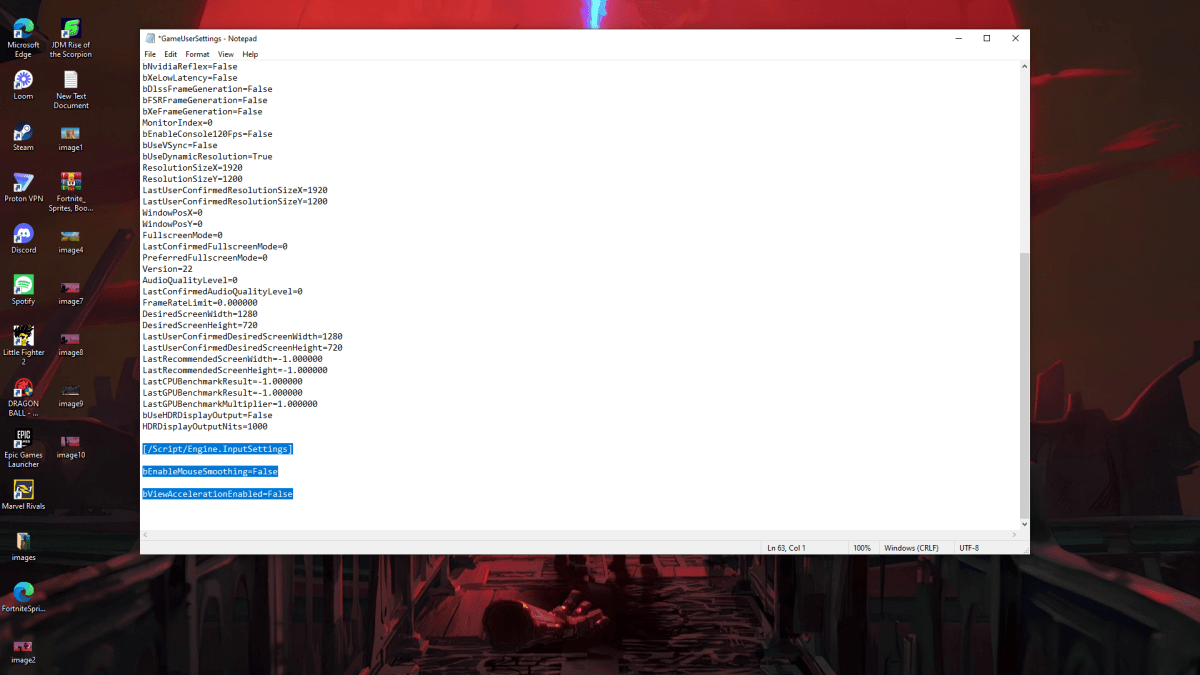
Since the game offers no in-game setting to disable mouse acceleration, you must directly modify the game's configuration file. This is a straightforward process:
- Press Windows key + R, then type
%localappdata%and press Enter. - Locate the "Marvel" folder, then navigate to "MarvelSavedConfigWindows".
- Open the "GameUserSettings.ini" file using Notepad (or a similar text editor).
- Add the following lines to the end of the file:
[/Script/Engine.InputSettings]
bEnableMouseSmoothing=False
bViewAccelerationEnabled=False- Save the changes (Ctrl + S), then close the file.
- Right-click "GameUserSettings.ini", select "Properties", check the "Read-only" box, click "Apply", and then "OK".
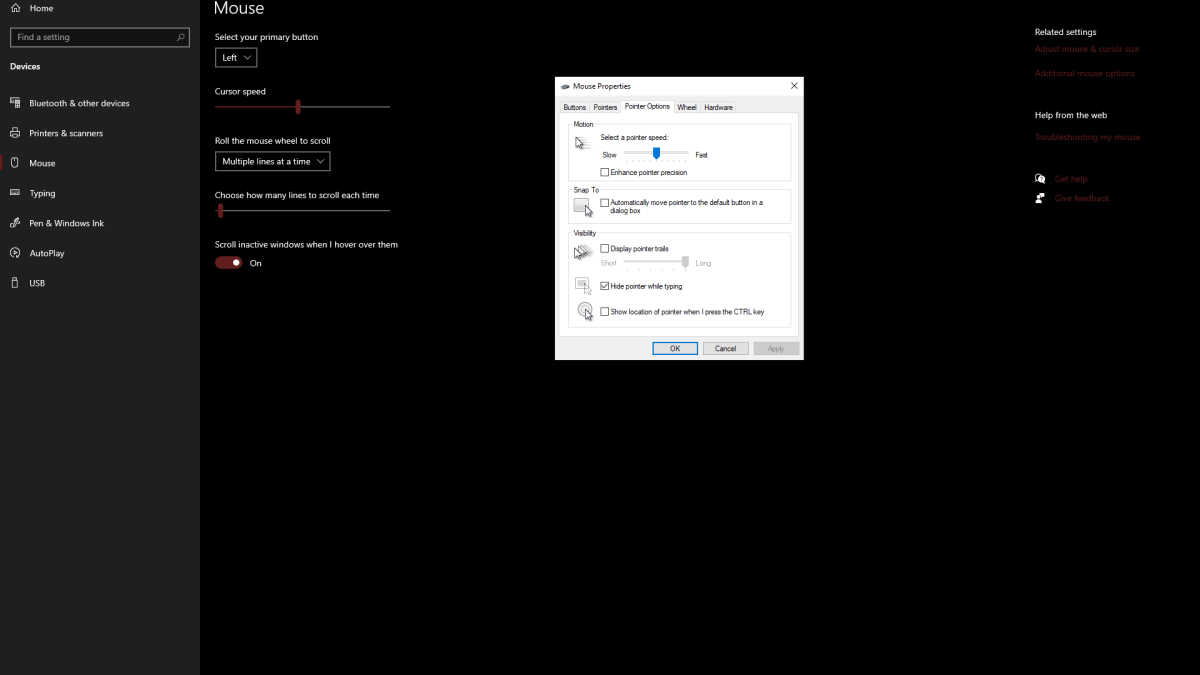
You've now disabled mouse acceleration within Marvel Rivals. For optimal results, also disable mouse acceleration in Windows settings:
- In the Windows search bar, type "Mouse" and select "Mouse settings".
- Click "Additional mouse options" in the top right corner.
- Go to the "Pointer Options" tab and uncheck "Enhance pointer precision".
- Click "Apply" and then "OK".
With mouse acceleration disabled in both the game and Windows, your aim will be significantly improved due to consistent sensitivity.
Related: Troubleshooting Marvel Rivals Issues
Understanding Mouse Acceleration and Its Impact on Gameplay
Mouse acceleration dynamically adjusts your mouse sensitivity based on movement speed. Faster movements result in higher sensitivity, while slower movements lead to lower sensitivity. While convenient for general use, this is detrimental to shooters like Marvel Rivals.
Consistent sensitivity is crucial for building muscle memory and improving aim. Mouse acceleration prevents this by constantly changing your sensitivity, hindering the development of precise aiming skills.
By following these steps, you can eliminate mouse acceleration and enjoy a more responsive and consistent aiming experience in Marvel Rivals.
Marvel Rivals is currently available on PS5, PC, and Xbox Series X|S.
-
 At Droid Gamers, we extensively cover REDMAGIC devices—including our recent review of the 10 Air just last week.Designed specifically for gamers, these phones demonstrate thoughtful innovation. As we noted in our Air review, Nubia consistently refineAuthor : Adam Dec 03,2025
 -
 Go Go Muffin will launch a fresh crossover collaboration with the beloved mascot franchise Bugcat CapooExclusive cosmetics, in-game events, and additional content will debut starting March 19thThe Class Change 3 update has also landed, introducing fiAuthor : Christopher Dec 03,2025




















- Stardew Valley: How To Befriend Willy
- DISCOVERY CHANNEL TO UNVEIL CROSSOVER IN 'Reverse: 1999' 2.0
- Crunchyroll Game Vault adds Battle Chasers: Nightwar, Dawn of the Monsters, Evan’s Remains and more
- Hotta Studio's Open-World RPG, Neverness to Everness, Announced
- Military Strategy Game Warpath Launches a Navy Update with 100 New Ships
- Half-Life 3 Speculations Spark Again as Risk of Rain Original Devs Join Valve's Game Dev Team