
Fortnite Mobile: Accessing and Buying Skins with V-Bucks
You can now play Fortnite Mobile on your Mac! Start with our complete guide on how to play Fortnite Mobile on Mac with BlueStacks Air.
Fortnite Mobile, developed by Epic Games, is a renowned battle royale and sandbox survival game that has captured the hearts of gamers worldwide. A key feature of the game is the Fortnite Item Shop, an in-game marketplace where players can enhance their gameplay experience by purchasing cosmetic items. The shop refreshes daily, presenting a dynamic selection of skins, emotes, pickaxes, and more. This guide aims to offer a comprehensive understanding of the Item Shop, detailing the types of items available, how to acquire V-Bucks, and strategic tips for maximizing your purchases.
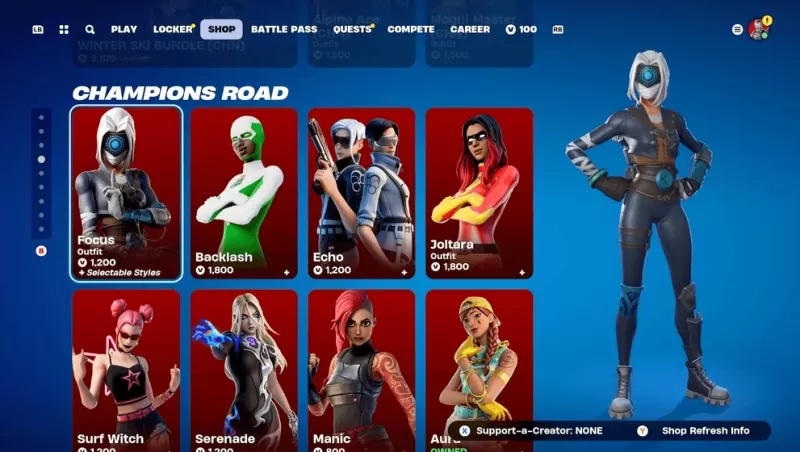
How to Access the Item Shop
Accessing the Item Shop is straightforward:
- Launch Fortnite on your preferred device, whether it's a PC, console, or mobile.
- From the main menu, navigate to and click on the Item Shop tab.
- Browse the available items, which are organized by type and bundled offers.
- Select any item to view detailed information and explore purchase options.
The Item Shop refreshes daily at 00:00 UTC, ensuring a constant influx of new items while some older ones may be phased out.
Strategies for Smart Shopping
To make the most out of your Item Shop visits, consider the following strategies:
- Check Daily Rotations: The shop's inventory changes every 24 hours, so regular checks help you stay updated on new arrivals and avoid missing out on limited items.
- Save for Rare & Special Skins: Event-specific skins often have limited availability and might not return for a long time, making them worth the wait and investment.
- Consider Battle Pass Over Single Purchases: Opting for the Battle Pass can offer more value for your V-Bucks, providing a variety of rewards over time.
- Monitor Bundles: Sometimes, items are offered at a discount when purchased in bundles compared to individual purchases.
- Use Websites for Predictions: If you're on the lookout for a specific item, prediction websites can give you an idea of when it might appear in the shop.
The Fortnite Item Shop is central to personalizing your gaming experience, offering an ever-changing array of cosmetics. By understanding its mechanics, wisely managing your V-Bucks, and employing strategic shopping tactics, you can enhance your Fortnite journey. For Mac users eager to dive into the action, be sure to explore our Download Guide to ensure a smooth installation of Fortnite on your system. Enjoy the thrill of Fortnite Mobile on your PC or laptop with the enhanced capabilities of BlueStacks!
-
 This week's free game lineup on the Epic Games Store mobile app is here, and it features DC Heroes United alongside Shapez.Whether you love factory simulations or superhero action, there's something for everyone. The games are free to claim from JuneAuthor : Andrew Apr 24,2026
 -
 Shadow Fortress is the new elite dungeon featuring high-stakes encountersNew Imprint System lets you push your stats furtherThe Summer Island event features loads of rewards to gatherOdin: Valhalla Rising is turning up the heat this summer with its sAuthor : Camila Apr 22,2026












- Retro-Style Arcade Racer Victory Heat Rally Is Coming To Mobile Soon Via Crunchyroll!
- DISCOVERY CHANNEL TO UNVEIL CROSSOVER IN 'Reverse: 1999' 2.0
- Crunchyroll Game Vault adds Battle Chasers: Nightwar, Dawn of the Monsters, Evan’s Remains and more
- Hotta Studio's Open-World RPG, Neverness to Everness, Announced
- Military Strategy Game Warpath Launches a Navy Update with 100 New Ships
- Golden Joystick Awards 2024 Was a Big Showing for Indie Games