
Top iPad Keyboards for 2025: Buying Guide
While an iPad is a fantastic device on its own, typing on its touch screen can be cumbersome, especially for longer texts. This is where a keyboard becomes the best iPad accessory, transforming your tablet into a laptop-like experience for efficient typing.
TL;DR – These Are the Best iPad Keyboards:
 Our Top Pick### Logitech Pebble Keys 2 K380s
0See it at Amazon ### Apple Magic Keyboard
0See it at AmazonSee it at Best Buy ### Omoton Ultra-Slim Bluetooth Keyboard
0See it at Amazon ### Harburfine 7 Color Backlit Bluetooth Keyboard
0See it at Amazon ### iClever BK03
0See it at Amazon ### Logitech MX Mechanical
0See it at Amazon ### iClever BK06
0See it at Amazon ### Logitech Combo Touch
0See it at AmazonSee it at Logitech ### ZAGG Pro Keys Wireless Keyboard
0See it at AmazonIn some instances, you can find a keyboard that doubles as a great iPad case. With hundreds of manufacturers offering various models, we've compiled a list of our top picks. Many of these selections are compatible with the latest iPad Air and 11th generation iPad models, perfect for enhancing your experience with Apple's newest tablets.
Additional contributions by Dave Johnson
Logitech Pebble Keys 2 K380s
Best iPad Keyboard
Our Top Pick### Logitech Pebble Keys 2 K380s
0The Logitech Pebble Keys 2 K380s stands out with its slim, lightweight design and fluid scissor keys. It offers simple Bluetooth pairing and an impressive three-year battery life, making it an ideal portable companion for your iPad. This model enhances the original K380 with longer battery life and additional shortcuts. Bluetooth improvements ensure a reliable connection, and the Logitech Bolt receiver support makes it easy to pair with laptops and PCs. The Easy-Switch buttons allow seamless transitions between three connected devices.
The design remains sleek, compact, and lightweight, featuring low-profile scissor keys that provide a quiet, laptop-like typing experience. The unique rounded shape of the keys adds a distinctive aesthetic, and despite its compact size, the keyboard maintains well-spaced keys and useful controls.
See it at AmazonProduct SpecificationsCompatibilityiOS, PC, Mac, Android, ChromeFast-switchingYesKey switchScissorLightingNoneBatteryAAA Battery Life3 yearsSize10.98 x 4.88 x 0.63 inchesWeight14.6 ounces (with batteries)PROSLong lasting batteryUnique rounded keysCONSInitially awkward
Apple Magic Keyboard
Best Keyboard for iPad Pro
### Apple Magic Keyboard
0Designed specifically for the iPad Pro, the Apple Magic Keyboard offers the best typing experience for those willing to invest. It features a premium, sleek build with a floating cantilever design, allowing for the perfect viewing angle. The latest version is lighter and includes a larger glass trackpad with haptic feedback and Multi-Touch gesture support.
Connecting your iPad to the Magic Keyboard is effortless, thanks to ultra-strong magnets. However, this new magnet placement means it's only compatible with the latest models. The keyboard also serves as a protective case when not in use, and a USB-C port allows for passthrough charging.
Typing on the Magic Keyboard is a delight, with scissor key switches providing feedback similar to the best Macbooks. While the keys are slightly more cramped than those on a notebook, they are easy to adapt to. The keyboard includes 14 function keys for adjusting brightness, volume, and more, turning your iPad into a laptop replacement.
See it at AmazonSee it at Best BuyProduct SpecificationsCompatibilityiOS Fast-switchingNoKey switchScissorLightingYesBatteryPowered via iPadBattery LifeN/ASize10.7 x 8.1 x 1 inchesWeightNot listedPROSPremium, sleek buildKey switches offer good feedbackCONSLimited compatibility
Omoton Ultra-Slim Bluetooth Keyboard
Best Budget iPad Keyboard
### Omoton Ultra-Slim Bluetooth Keyboard
0For budget-conscious users, the Omoton Ultra-Slim Bluetooth Keyboard is an excellent choice at just $20. It's ultra-lightweight at 9.9 ounces and thin at 0.24 inches, making it easy to carry. The keyboard uses AAA batteries and connects via Bluetooth. Its design, featuring responsive low-profile scissor keys on an ergonomic angle, complements Apple's aesthetic nicely.
See it at AmazonProduct SpecificationsCompatibilityiOS, AndroidFast-switchingNo Key switchScissor LightingNoBatteryAAABattery Life30 daysSize11.2 x 4.7 x 0.24 inches Weight9.9 ouncesPROSUltra lightweightErgonomic designCONSRequires AAA batteries
The Best Apple Deals
Apple AirPods (2nd Generation)- $89.00Apple AirPods Pro (2nd Gen)- $189.99Apple iPad (9th Generation)- $199.00Apple AirTag 4 Pack- $79.98Apple 2024 MacBook Air 13-inch Laptop- $929.004. Harburfine 7 Color Backlit Bluetooth Keyboard
Best Backlit iPad Keyboard
### Harburfine 7 Color Backlit Bluetooth Keyboard
0The Harburfine 7 Color Backlit Bluetooth Keyboard is perfect for typing in dim environments. It offers seven different backlight colors and an auto-sleep mode to conserve battery life. Powered by a rechargeable battery, it lasts about four hours with the backlights on and up to 20 days when off.
This keyboard's ultra-compact design, weighing less than half a pound and measuring about a quarter inch thick, makes it one of the best travel keyboards. However, its build is somewhat flimsy, so handle it with care. Once connected via Bluetooth, the scissor keys provide a quiet and responsive typing experience.
See it at AmazonProduct SpecificationsCompatibilityiOSFast-switchingYes Key switchScissorLightingYesBatteryRechargeableBattery Life4 hours (backlit keys on) or 15-20 daysSize9.7 x 5.9 x 0.26 inchesWeight6.9 ouncesPROSSeven color options for backlit keysCompact designCONSFlimsy build
iClever BK03
Best Folding iPad Keyboard
### iClever BK03
0The iClever BK03 stands out with its folding design, making it perfect for travel. Made almost entirely of aluminum, it offers durability and a sleek look. When unfolded, it measures 10 by 3.5 by 0.3 inches and powers on automatically. It features a rechargeable battery with over 80 hours of continuous use and can remain charged for over 200 days in sleep mode.
Compatible with iOS, Android, and PCs, it allows switching between three paired devices. However, the unfolded keyboard doesn't lock rigidly in place, limiting its use to hard surfaces.
See it at AmazonProduct SpecificationsCompatibilityiOS, Android, PCFast-switchingYesKey switchScissorLightingYes BatteryRechargeable Battery Life10 daysSize9.6 x 5.9 x 0.24 inchesWeight5.99 ouncesPROSFolds for travelDurable mostly aluminum buildCONSUnfolded keyboard doesn’t lock in place
Logitech MX Mechanical
Best Desktop iPad Keyboard
### Logitech MX Mechanical
0For a desktop setup, the Logitech MX Mechanical is a top choice. This full-size mechanical keyboard features responsive, low-profile keys and multiple connectivity options, including low-power Bluetooth and a 2.4GHz wireless dongle. It includes a full number pad, arrow keys, and function keys, with smart backlighting for an enhanced typing experience.
The keyboard's rechargeable battery lasts 15 days with backlighting on and 10 months with it off. It's ideal for those who want a high-quality keyboard that works well with their PC and laptop, too.
See it at AmazonProduct SpecificationsCompatibilityiOS, PC, AndroidFast-switchingYes Key switchMechanicalLightingYesBatteryRechargable batteryBattery Life15 days (backlighting on), 10 months (backlighting off)Size5.18 x 17.08 x 1.02 inches Weight1.8 poundsPROSResponsive mechanical switchesFull size keyboardCONSBulkier than others on list
iClever BK06
Best Ergonomic iPad Keyboard
### iClever BK06
0The iClever BK06 is designed for those who prefer an ergonomic typing experience. Its unique split and angled layout may take some practice to master, but it offers comfort for extended typing sessions. The keyboard folds for travel and uses a rechargeable battery, lasting about 40 continuous hours or 30 days on standby.
Compatible with iOS, Android, and PCs, this keyboard is a great choice for users seeking both comfort and portability.
See it at AmazonProduct SpecificationsCompatibilityiOS, Android, PCFast-switchingYesKey switchScissorLightingNoneBatteryAAABattery Life30 days Size12.9 x 4.0x 0.23 inches Weight9.9 ouncesPROSSplit and angled ergonomic layoutFoldableCONSTakes some practice to master
Logitech Combo Touch
Best iPad Keyboard Cover
### Logitech Combo Touch
0The Logitech Combo Touch combines protection with functionality, featuring a backlit keyboard and a trackpad for enhanced typing and text selection. It connects easily to your iPad via the Smart Connector, drawing power directly from the device for uninterrupted use. Compatible with the new iPad A16 and 10th generation iPad, it offers superior protection compared to Apple's Magic Keyboard.
The Combo Touch includes a kickstand for flexible viewing angles and allows the keyboard to be detached for handheld use. The backlit keys adjust automatically for dim environments, and the trackpad supports Multi-Touch gestures.
See it at AmazonSee it at LogitechProduct SpecificationsCompatibilityiPadOS Fast switchingNoKey SwitchScissorLightingYesBatterySmart Connector Battery life N/ASize10 x 7.5 x 0.8 inchesWeight20.2 ouncesPROSEasily connects to iPadDoubles as a protective caseCONSDoesn't hold Apple Pencil well
Zagg Pro Keys Wireless Keyboard
Best Detachable iPad Keyboard
### ZAGG Pro Keys Wireless Keyboard
0The ZAGG Pro Keys Wireless Keyboard offers the flexibility of detaching the keyboard from the case, allowing you to use your iPad independently. It features a multicolored backlit keyboard and can fold to act as a stand. The keyboard connects via Bluetooth and doubles as a screen protector when folded.
While the backlighting isn't the brightest, it adds a stylish touch to your setup. This keyboard and case combo is ideal for those who frequently travel with their iPad.
See it at AmazonProduct SpecificationsCompatibilityiPadOSLightingYesBattery life3 months Size11.89 x 8.35 x 1.54 inchesWeight1.48 poundsPROSMulti-colored backlighting and trackpad includediPad easily detaches from keyboard caseCONSBacklighting isn't the brightest
iPad Keyboard FAQ
Do you need a keyboard for your iPad?
If your iPad use is limited to short messages and notes, the touchscreen keyboard might suffice. However, for those planning to type more extensively, a physical keyboard significantly enhances the typing experience. It offers a satisfying response, faster typing, and frees up screen space. Additionally, keyboards can provide an edge when playing some of the best iPad games.
-
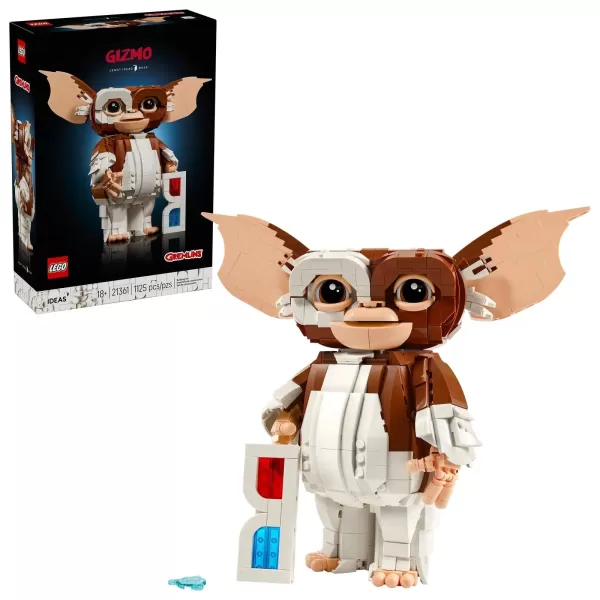 LEGO’s October lineup is already shaping up to be exceptional, with fresh Wednesday-themed sets and the long-awaited LEGO Game Boy making waves. But another thrilling build is ready to steal the spotlight this spooky season: Gizmo from Gremlins is joAuthor : Joshua Feb 24,2026
 -
 Deluxe PackPriced at $59.99, the Deluxe Pack contains the following items: ⚫︎ Early Adopter Item ⚫︎ Name in Credits ⚫︎ Discord Role ⚫︎ Miller’s OPA Heavy Armor ⚫︎ Spec Ops Assault RifleThis pack is exclusively available on Owlcat Games’ officialAuthor : Noah Feb 23,2026


















- Stardew Valley: How To Befriend Willy
- Crunchyroll Game Vault adds Battle Chasers: Nightwar, Dawn of the Monsters, Evan’s Remains and more
- DISCOVERY CHANNEL TO UNVEIL CROSSOVER IN 'Reverse: 1999' 2.0
- Hotta Studio's Open-World RPG, Neverness to Everness, Announced
- Military Strategy Game Warpath Launches a Navy Update with 100 New Ships
- Half-Life 3 Speculations Spark Again as Risk of Rain Original Devs Join Valve's Game Dev Team